NEORACER DOCS
These docs are public and open source.Edit on GitHub
HARDWARE / SENSORS

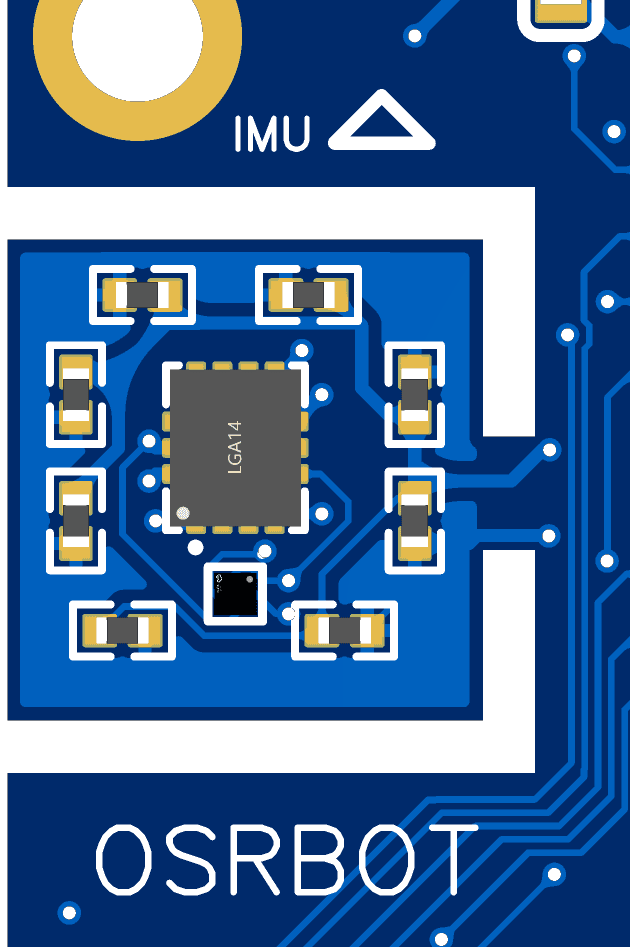
THE ONBOARD IMU.

Two parts on one board: a QMI8658A (3-axis accelerometer and 3-axis gyroscope) and a QMC6309 (3-axis magnetometer), nine axes between them. They report how the car is accelerating, how fast it is turning, and where magnetic north sits, all in the imu_link frame at 100 Hz.

QMI8658A + QMC63090 Hzaccel m/s^2gyro rad/smag teslasframe_id: imu_link
01 / WHAT IT MEASURES

WHAT IT MEASURES.

Each of the three sensors answers a different question. The accelerometer reads linear acceleration along x, y, and z in metres per second squared, which includes gravity. The gyroscope reads angular velocity around each axis in radians per second. The magnetometer reads the local magnetic field in teslas, which is what you would lean on for an absolute heading.

01

Accelerometer

Linear acceleration in m/s^2, gravity included.
The three axes tell you how the chassis is accelerating. At rest the vector points along gravity, so it doubles as a coarse tilt reference once you have subtracted the parts you do not care about.
02

Gyroscope

Angular velocity in rad/s around each axis.
This is the rate of rotation, not the angle. Integrating it gives you orientation, but the drift adds up, which is why most yaw estimates pair the gyro with another source rather than trusting it alone.
03

Magnetometer

Local magnetic field in teslas, on the car only.
The field direction points you toward magnetic north, which makes it the anchor for an absolute heading. Motors and metal nearby bend the reading, so the magnetometer is the one that most rewards calibration.
02 / PYTHON API

THE rc.physics API.

One thing to flag up front, because it surprises almost everyone: the IMU is not rc.imu. It lives under rc.physics, alongside the rest of the motion sensing. The three calls map straight onto the three sensors.

python
accel = rc.physics.get_linear_acceleration() # (x, y, z) in m/s^2 gyro = rc.physics.get_angular_velocity() # (x, y, z) in rad/s mag = rc.physics.get_magnetic_field() # (x, y, z) in teslas, car only print(accel) # e.g. acceleration along each axis, gravity included print(gyro) # turn rate around each axis print(mag) # magnetic field vector
  • rc.physics.get_linear_acceleration() · linear acceleration in m/s^2, gravity included.
  • rc.physics.get_angular_velocity() · angular velocity in rad/s around each axis.
  • rc.physics.get_magnetic_field() · magnetic field in teslas. Available on the car only.
03 / WHAT TO EXPECT

WHAT IT OUTPUTS.

The readings come through raw and bias-corrected. They are not run through an orientation filter, so there is no fused roll, pitch, or yaw waiting for you. That is by design: the smoothing and sensor fusion are yours to write, so you stay in control of the trade-off between responsiveness and noise rather than inheriting one. A light moving average over the accelerometer, or a complementary filter that blends the gyro with the magnetometer, is a reasonable place to start.

04 / ROS 2 TOPICS

THE ROS 2 TOPICS.

Under the hood, imu_node publishes the inertial data and the magnetic field on two separate topics, both stamped in the imu_link frame.

TopicMessage typeFrameUnits
/imusensor_msgs/Imuimu_linklinear accel m/s^2, angular velocity rad/s
/magsensor_msgs/MagneticFieldimu_linkmagnetic field in teslas
05 / ON THE CAR

ON THE CAR.

On the shipping car, the IMU does not talk to the Jetson directly. An MCU (microcontroller unit) sits between them and bridges the sensor to the Jetson, then the data surfaces on the same topics and the same rc.physics calls you saw above. The MCU is also why the magnetometer reading is present on the car: that path carries the full 9-axis stream.

06 / SPEC AT A GLANCE

THE SPECIFICATIONS.

Sensor
QMI8658A + QMC6309 (9-axis)
Accelerometer
m/s^2
Gyroscope
rad/s
Magnetometer
teslas
Rate
100 Hz
Frame
imu_link