The car comes with stock Ubuntu directories such as Desktop, Documents, Downloads, and more. There are six directories that are installed on the car.
Directory
Description
ros2_ws
Stores the latest version of the driver.
jupyter_ws
Stores the Python library, starter code, and any additional code you write.
osracer_ws
The vendor stack: robot description, SLAM and Nav2.
neoracer-installer
The installer that set the car up.
logs
One timestamped folder per run of the driver.
data
Object-detection datasets, written by the camlabel dashboard.
ros2_ws stores the neoracer_ros2_driver pulled from GitHub. You can view your dashboards, trained models, launch and config files, and all the setup scripts used to initialise the NeoRacer.
jupyter_ws is the main workspace where code is written. JupyterLab is available in your browser as a service on port 8888, and its file system is this folder.
In the workspace there is labs and library. labs holds the lab exercises and some template code. library has all the rc.* modules that we use in the Python API reference. The tests folder holds the test notebook used in Test the system.
//Opening JupyterLab
It is one of the four services that start at boot, so there is nothing to launch. Join the car's network and open its address on port 8888.
bash
http://192.168.10.100:8888# cudy routerhttp://10.42.0.1:8888# the car's access point
//Notebooks or scripts
Notebook (.ipynb)
Script (.py)
Good for
Running small tests, checking values, teaching
A normal program run start to finish
How you run it
Cell by cell in the browser
python3 <file> from a terminal
State
Kept in the kernel between cells
Gone when the program exits
//Restart the kernel
A notebook holds the car's sensors for as long as its kernel is alive, even after the last cell has finished. If you open a second notebook, or run a script while a notebook is still loaded, the second one might fail.
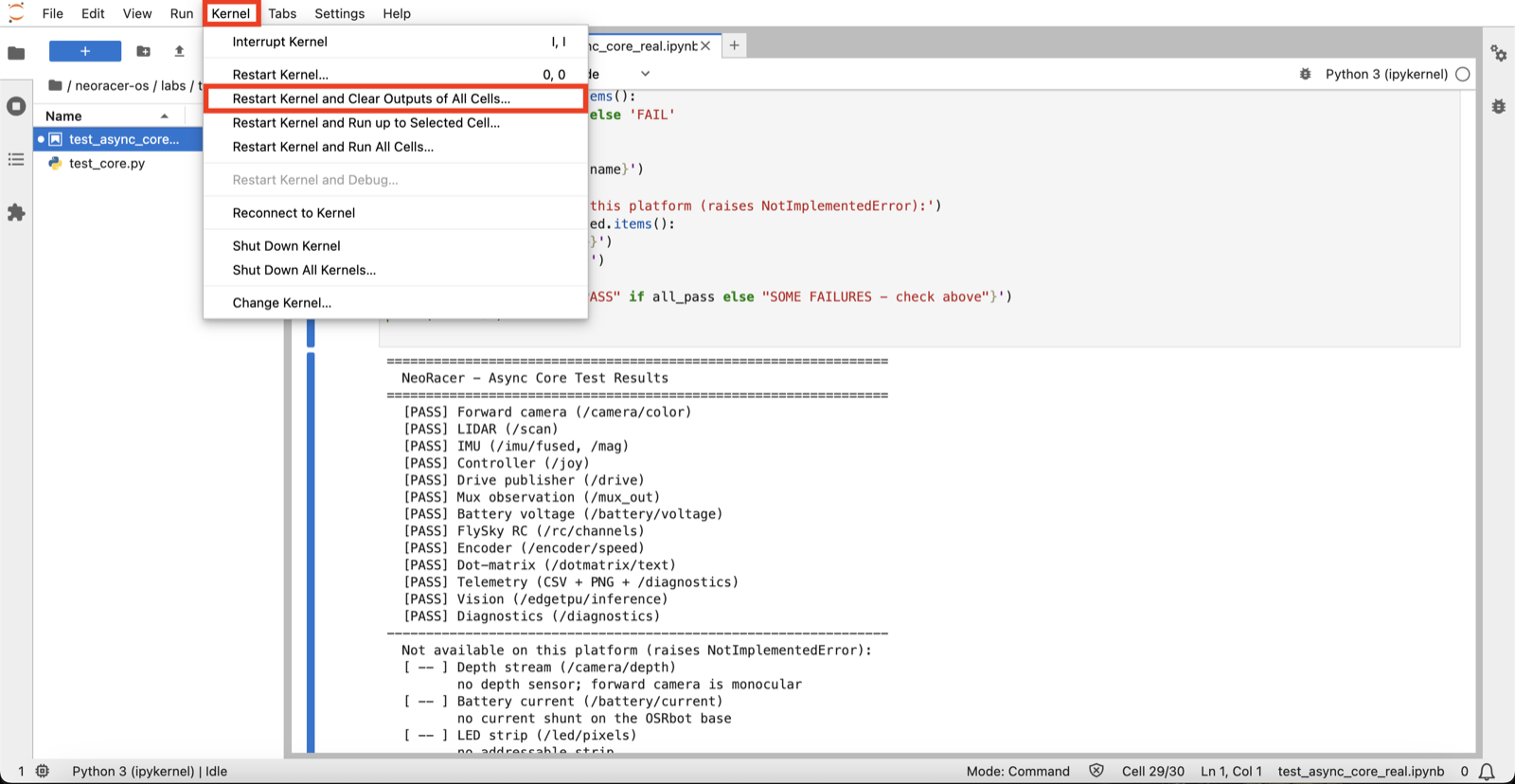
When you are done, open the Kernel menu and choose Restart Kernel and Clear Outputs of All Cells.
A second ROS 2 workspace, preinstalled on the image. It holds the autonomy tier: the robot description, SLAM and Nav2.
This refers to the logs in the ~ directory, not the logs in neoracer-installer. Every run of the stack writes a timestamped folder here, and logs/latest points at the most recent one. The health dashboard reads it.
//data
data is created by the camlabel dashboard the first time you use it. It holds the captured images, their labels, and object classes, in YOLO format. This folder becomes a training dataset.